What Happens When Your Software Needs a Human Approval?
Software and AI agents can do most work on their own. But some steps need a human to approve, reject, or take over.
Most tools ask for that human by email, chat, or SMS. Those messages arrive quietly and wait. If the right person is asleep or busy, the approval waits too.
M91 fixes that. It rings the right people's phones until someone answers, then sends the answer back to your software.

What Is M91?
M91 is an alerting app from Walkover that reaches a real person when software needs a decision. It rings phones through silent mode, calls if nobody answers, and records who replied, what they chose, and when. Setup takes one link.
What Is Human-in-the-Loop (HITL)?
Human-in-the-loop (HITL) means software does the work, but a person checks or decides at key steps.
Common HITL moments are:
Human approval: a person says yes or no before the software continues.
Human review: a person checks something before it goes out.
Human takeover: a person steps in and handles what the software can't.
The hard part of HITL is reaching the human in time. That's the gap M91 fills.
The Problem: HITL Approvals Get Missed
Here's a common example. An order needs a manager's approval at night. The system sends an email. The manager sees it the next morning. By then, it's too late.
Nothing broke. The message was just too quiet.
Email, chat, and SMS are fine for updates. They are the wrong tool when someone has to act now.
How M91 Works
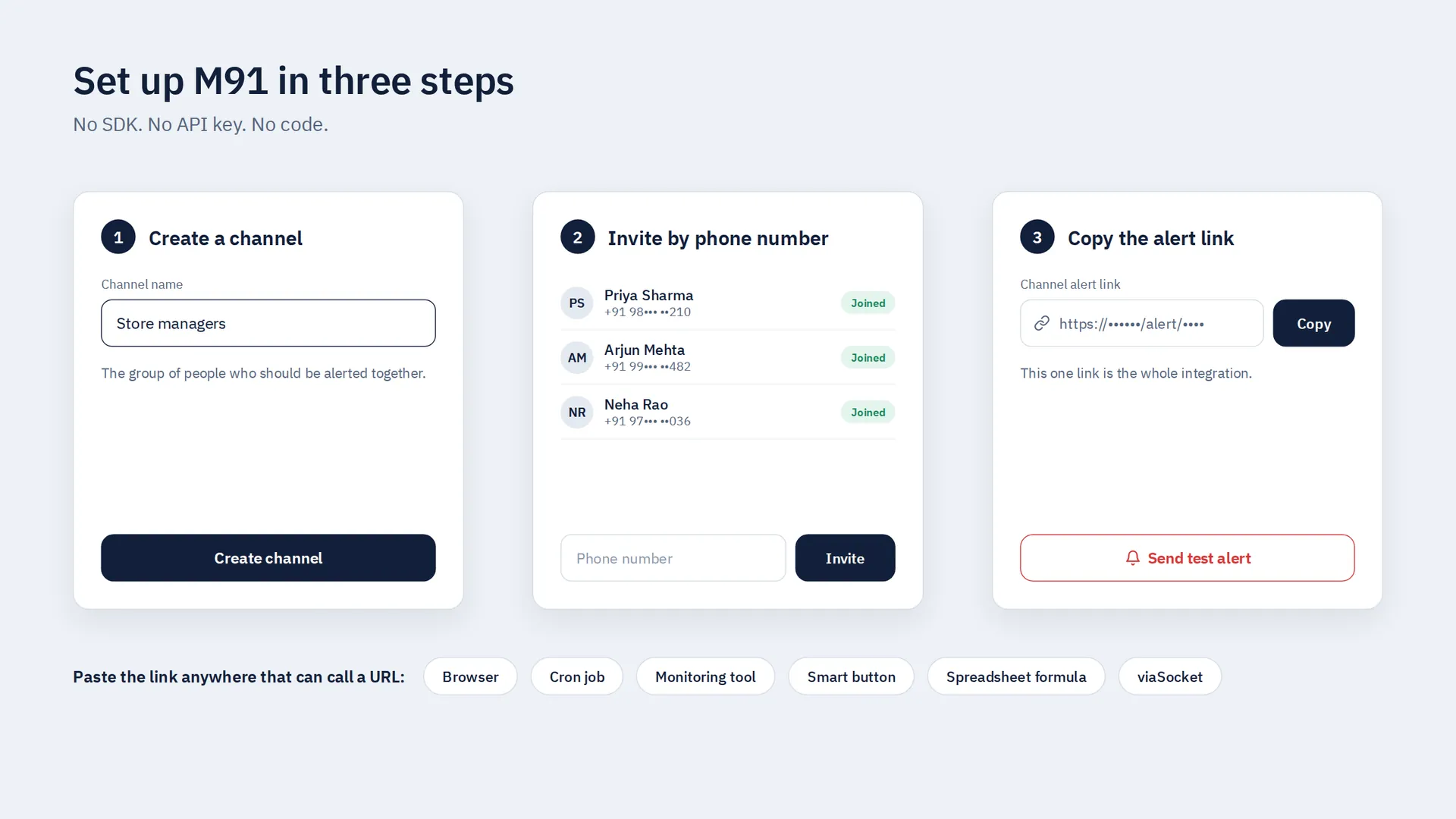
Setup takes three steps.
Create a channel. A channel is the group of people who should be alerted together, like your on-call team or store managers.
Invite people by phone number.
Copy the channel's alert link.
That link is the whole integration. When something calls the link, M91 sends the alert.
This is how you add a human approval step to any automation, workflow, or AI agent that can call a URL. You can also use the link in a browser, a cron job, a monitoring tool, a smart button, or a spreadsheet formula. No SDK. No API key. No code.
Want to check it first? Send a test alert with one tap and watch your phone ring.
If your team uses viaSocket, M91 also has ready-made actions there, You can send alerts, check answers, and close alerts from your approval workflows.
What Happens When an Alert Is Sent
Every phone in the channel rings. It rings at full volume, through silent mode and Do Not Disturb.
It keeps ringing until someone answers. One buzz is not enough for urgent work.
No answer? M91 calls. The alert escalates to a phone call. Higher severity alerts escalate on their own, and critical alerts show first.
You get a clear record. M91 saves who answered, what they chose, and when. That answer can go back to the system that sent the alert.
The alert stays open until it is handled or closed.

Approve, Reject, or Take Over: You Choose the Reply
You write the reply buttons in your own words. For example:
"I'm on it"
"Approve"
"Reject"
"Already done"
That's a full human approval workflow in four buttons.
For each answer, you choose what it does:
Settle it for everyone. One person answers and every other phone stops ringing. This is how a human takeover works in M91: one person taps "I'm on it," and the team knows it's handled.
Just for me. The answer counts for that person only. The alert stays open for the rest.
People can also attach a photo, PDF, audio, video, or link when they answer. You can make a note or file required before someone replies.

HITL for Automations and AI Agents
Automations and AI agents move fast. Some steps still need human oversight, like a large refund, an unusual order, or a failed payment.
When your automation reaches one of those steps, it calls your M91 alert link. A person gets the alert and can approve it, reject it, or take over. M91 records the answer, and it can go back to the system that asked.
Your software keeps working on its own. A human steps in only when it matters.
M91 Only Rings When It Should
An alert app should stay quiet until it's needed. M91 does three things to keep noise down:
It only interrupts when you said so, at the urgency you picked.
Repeats collapse into one alert. The same problem won't wake your team five times.
Handled alerts stop everywhere. Once someone deals with an alert, it stops ringing on every phone right away.
An alert nobody hears is just a log entry.

Who Uses M91
M91 works anywhere a person must act and it can't wait.
Automations and AI agents: A workflow needs human approval before it acts, or a human takeover when it gets stuck.
Business: An order needs approval, a payment failed, or a customer is waiting on a decision.
Operations: A server, service, or device fails and an engineer needs to know.
Health: A monitoring system detects a condition and a carer or clinician must respond.
Security: Someone enters where they shouldn't.
Safety: A connected system detects danger and people on site need to act.
Reminders: Something must be done, checked, approved, or confirmed.
Get Started
Get M91 and create a channel.
Invite yourself by phone number.
Send a test alert.
If your phone rings, you're ready to add a human-in-the-loop step to your software.
👉 Try M91 and send your first test alert
Frequently Asked Questions
What is M91?
M91 is an alerting app from Walkover. It reaches a real person when software needs a decision. It rings phones through silent mode, calls if nobody answers, and records who replied, what they chose, and when.
What is HITL?
HITL stands for human-in-the-loop. It means software does the work, but a person approves, reviews, or takes over at key steps. M91 makes sure that person gets the alert and answers it.
What is a human takeover?
A human takeover is when a person steps in to handle something an automation or AI agent can't finish alone. In M91, a person can tap a reply like "I'm on it," and every other phone stops ringing.
How do I add human approval to an automation or AI agent?
Create an M91 channel, invite the approvers by phone number, and copy the channel's alert link. When your automation or AI agent calls that link, M91 alerts the approvers. Their answer, like "Approve" or "Reject," is recorded and can go back to your system.
Do I need to write code to use M91?
No. Each channel has its own alert link. Calling that link sends the alert. You don't need an SDK or an API key.
What happens if nobody answers an approval alert?
The alert escalates to a phone call. Higher severity alerts escalate on their own.
Will M91 send repeat alerts for the same problem?
No. Repeats of the same problem collapse into one alert. Once someone handles it, it stops ringing on every phone.
Can people attach files when they reply?
Yes. They can attach a photo, PDF, audio, video, or link. You can make a note or file required first.
Where can I get M91?
Get M91 for iPhone or Android and create a channel.
Related Articles
Shopify Checkout App: Why Every Ecom Founder Needs Split Payment Checkout
NPCI's MDR of 0.4% on eligible UPI transactions above ₹2,000 kicks in after roughly ₹1 lakh in monthly UPI collections. Learn how a split-payment checkout protects margins for Shop…
WhatsApp API Pricing Changes: Are You Ready for October 1?
Discover how MSG91 Chat Window lowers WhatsApp service costs after Oct 1, 2026 by keeping conversations in one ticket and routing ongoing chats through AI, flow-based bots, and hum…