
Google Sheets Holds Your Contacts. MSG91 Sends the Messages: Bulk SMS, WhatsApp, and Email Without Switching Platforms
Your spreadsheet already holds the data. Here is how to turn it into a fully automated communication engine — without switching platforms or writing a single line of code.
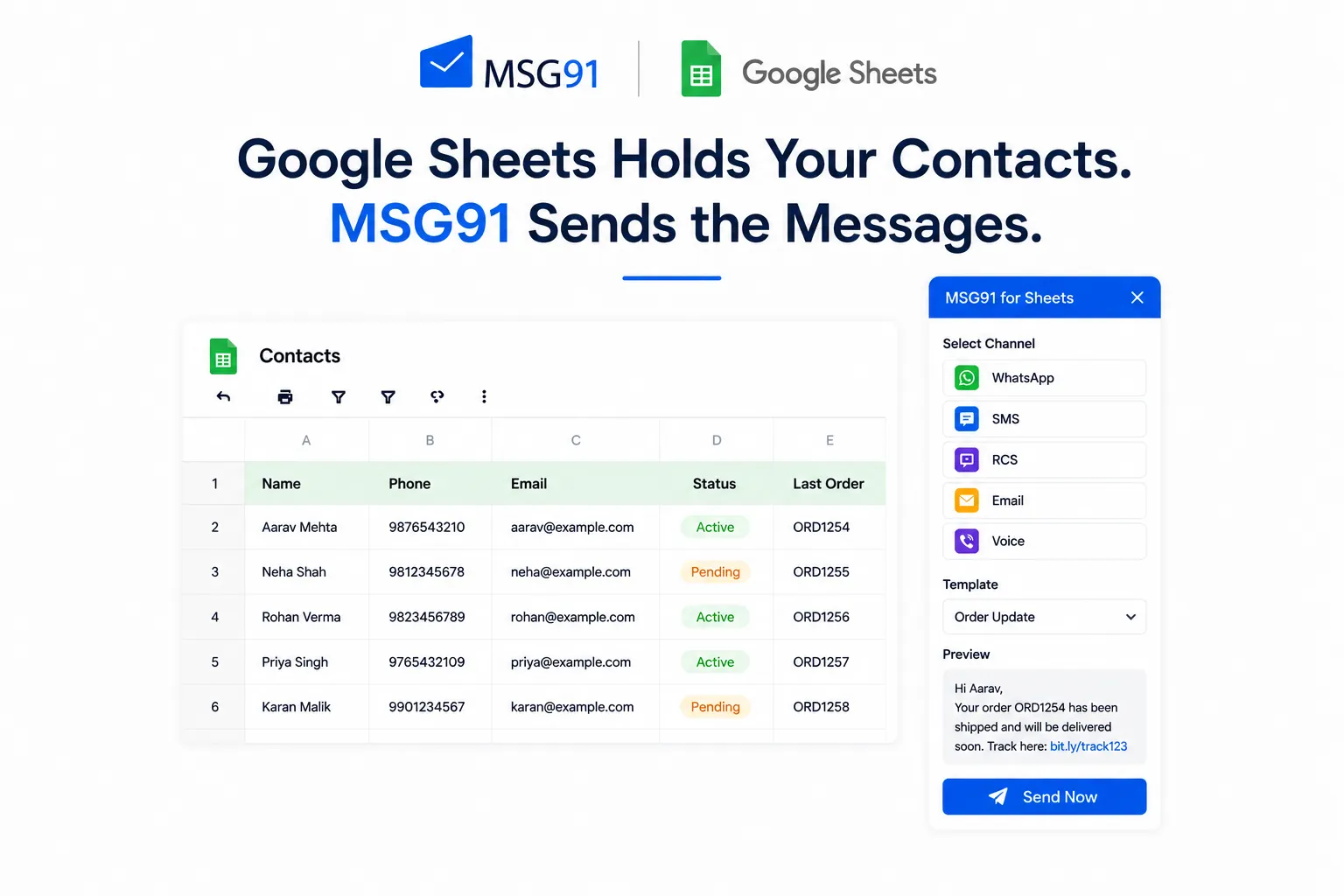
There is a particular kind of frustration that anyone who manages customer communication will recognise immediately. You have a Google Sheet in front of you — rows of contacts, campaign segments, order statuses, appointment details and to act on any of it, you have to export it, clean it, upload it somewhere else, configure a message, and hope nothing breaks in the process. By the time the message actually goes out, the moment has passed, or someone on the team has made a manual error, or the data has already changed.
This is the problem the MSG91 Google Sheets integration was built to eliminate. When MSG91 is connected to your Google Sheets environment, the spreadsheet stops being a passive record of data and becomes an active communication layer. You can send bulk SMS, Email, WhatsApp, RCS, and Voice messages directly from your sheet to the contacts in your rows, using the data in your columns without switching platforms or involving a developer. The information you already have becomes communication you can actually send, in a few clicks, at scale, with full control over what goes out and to whom.
According to industry research, businesses that automate customer communication see up to 30% improvement in response rates compared to manual outreach and the primary barrier for most small and mid-sized teams is not willingness but tooling. The MSG91 Google Sheets add-on removes that barrier by bringing messaging directly into the environment teams already work in every day.
This blog covers what the integration actually does, how to use MSG91 with Google Sheets across different team types, the industries where it creates the most value, and the practical questions worth asking before you set it up.
What Spreadsheet-Native Communication Actually Means
Before going into the specifics, it is worth thinking about why the ability to send messages directly from Google Sheets matters in the first place. Most businesses do not store their customer data in a CRM. They store it in Google Sheets. Sales teams track leads in Sheets. Operations teams manage logistics in Sheets. HR teams keep employee records in Sheets. Teachers and administrators at educational institutions use Sheets to track student information. Real estate agents use Sheets to manage property listings and buyer contacts.
These are not people who have failed to adopt a proper tool. These are people for whom a spreadsheet is the right tool — flexible, collaborative, instantly editable, and deeply familiar. What they lack is the ability to act on that data without leaving the environment they are already working in. Requiring them to export and re-import data into a separate messaging platform introduces friction, delay, and the very real possibility of errors introduced during the transfer. The MSG91 Google Sheets integration removes that requirement entirely.
Once the add-on is installed and your Authkey is configured, your sheet becomes capable of sending real messages to real people. The columns in your spreadsheet map to the variables in your message templates. A column called "First Name" becomes the personalisation field in your SMS. A column called "Order Number" becomes the tracking reference in your WhatsApp notification. The data you have already organised is exactly the data your messages need and now those two things are in the same place.
Key Features of the MSG91 Google Sheets Add-on
The MSG91 Google Sheets add-on brings a set of capabilities into the spreadsheet environment that would previously have required a dedicated messaging platform, a developer, and a fair amount of setup time. Here is what you get when you install it.
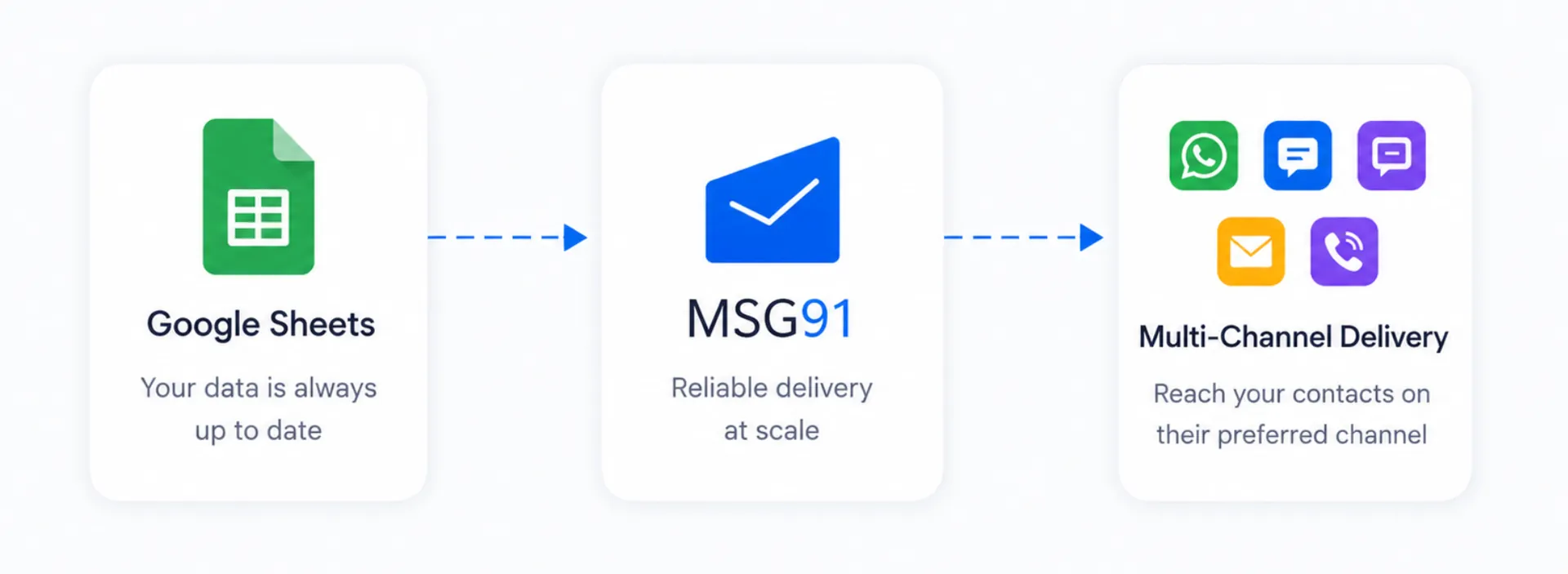
Send Bulk SMS, WhatsApp, and Email from Google Sheets in One Place
The integration supports SMS, Email, WhatsApp, RCS, and Voice messages — all from the same Google Sheets sidebar. You are not locked into a single channel and you are not required to set up separate workflows for each one. A team running a marketing campaign might send a WhatsApp message to engaged contacts and an SMS to those who do not use WhatsApp. A healthcare provider might send appointment reminders by SMS and follow-up reports by Email. The channel choice is made at the time of sending and can vary campaign by campaign depending on how your data is structured.
Row-Level Filtering for Targeted Bulk Messaging
One of the most practically useful features of the MSG91 bulk messaging Google Sheets add-on is the ability to select specific rows before triggering a send. You do not have to message every contact in a sheet every time you can highlight the rows that meet a particular condition and send only to those. Combined with column mapping, this means you can filter and personalise at the same time. Select the rows where a column says "Follow-up Pending," map another column to the recipient's name field in your template, and send a personalised follow-up to exactly the right contacts in a single action.
Trigger MSG91 Campaigns Directly from Your Spreadsheet
If your team has already built campaigns inside MSG91 with defined segments, templates, and sending logic the Google Sheets integration allows you to trigger those campaigns directly from your spreadsheet. There is no need to log into MSG91, navigate to the campaigns section, and manually initiate the send. The campaign exists in MSG91, the trigger happens from Sheets. For teams that run recurring campaigns on regularly updated data, this alone saves considerable time every week.
Transactional, Promotional, and Notification Messaging from One Interface
The integration works with all three major message categories. Transactional messages order confirmations, payment receipts, OTPs go through dedicated routes that prioritise delivery speed and compliance. Promotional messages offers, announcements, campaign outreach go through promotional routes with appropriate opt-in handling. Notification messages sit somewhere in between: operational updates, reminders, status alerts. Having all three available from the same Sheets interface means teams do not need separate workflows for each message type.
Message Preview Before Every Bulk Send
Before any bulk send goes out, the Google Sheets WhatsApp and SMS integration allows you to preview what the message will actually look like for a recipient. This sounds like a small feature. It is not. The number of bulk sends that go out with a broken personalisation field a message that reads Dear {First_Name} because the column mapping was off by one is significant enough that a preview step pays for itself many times over. You see the message as the recipient will see it, with real data from your sheet, before committing to send it to thousands of contacts.
Short URL Support for SMS Click Tracking
SMS messages have a character limit, and long URLs eat into that limit quickly while also making messages look cluttered and untrustworthy. The MSG91 Google Sheets integration supports short URLs automatically compressed links that take up less space and are easier for recipients to tap on mobile. Beyond aesthetics, short URLs also support click tracking, which means you can measure how many recipients actually followed a link in your SMS campaign useful data for any team trying to connect communication activity to measurable outcomes.
Full Email Configuration Including CC, BCC, and Custom Sender Details
For Email sends, the integration supports CC and BCC fields, custom sender names, sender email addresses, and domain settings. Your emails can come from the right address, look like they came from a real person at your organisation, and copy the right team members automatically all configured from within the Sheets sidebar without touching your email platform separately.
Industries That Benefit Most from Google Sheets Bulk Messaging
E-commerce and Retail
The e-commerce use case for bulk messaging from Google Sheets is almost self-evident. Order data lives in spreadsheets. Customer contacts live in spreadsheets. The connection between the two — a confirmation message, a shipping update, an abandoned cart reminder has historically required a platform integration or a developer. With the MSG91 Google Sheets add-on, a small e-commerce team can manage the entire communication cycle from a single sheet. An order ships, the tracking number is already in a column, and the SMS template pulls it automatically. Someone abandons a cart, the row gets flagged, and a WhatsApp message goes out without anyone manually initiating it.
Education and EdTech
Schools, universities, and online learning platforms deal with a constant volume of communication that is time-sensitive and highly personalised. Results notifications, attendance alerts, fee reminders, event announcements, examination schedules all of it is data that lives in administrative spreadsheets and needs to reach students, parents, and faculty quickly. An administrator with a sheet of student contacts and a column of exam results can send personalised result notifications to hundreds of students in the time it would take to manually compose a dozen emails.
Real Estate
Real estate is a relationship-driven business that runs heavily on follow-up timing. A lead that does not receive a response within the first hour is significantly less likely to convert than one that does. Most real estate agents track their leads in spreadsheets contact details, property interests, last contact date, current status. The MSG91 Google Sheets bulk SMS and WhatsApp integration allows those leads to be contacted directly from that sheet, with personalised messages referencing the specific property they enquired about. For developers running large-scale outreach, several thousand contacts can receive a launch announcement with property details pulled directly from the relevant columns.
Healthcare
Appointment no-shows cost clinics and hospitals significant revenue every month. Research from the healthcare sector consistently shows that SMS and WhatsApp reminders sent 24 hours before and again 2 hours before a scheduled appointment meaningfully reduce no-show rates. If the appointment schedule lives in a Google Sheet, the MSG91 integration makes sending those reminders a matter of a few clicks rather than a manual process. Beyond reminders, healthcare providers also need to send report notifications, prescription alerts, and post-consultation follow-ups all data-driven communication that the sheet already contains and MSG91 can deliver.
Banking and Financial Services
Financial communication is time-critical and compliance-sensitive. Transaction alerts, account statements, payment confirmations, and fraud notifications need to reach customers quickly through channels they actually check. Banks and financial institutions that manage customer data in spreadsheets can use the MSG91 Google Sheets integration to send that communication without the delay of platform re-imports. The transactional messaging route ensures financial messages go through paths that prioritise delivery and comply with applicable messaging regulations.
Travel and Hospitality
Travel is an industry where communication timing is everything. A booking confirmation that arrives an hour after the booking is made is a problem. A check-in reminder that arrives the day of check-in is helpful. A baggage update in real time is reassuring. All of this communication is tied to data booking references, travel dates, passenger names, hotel addresses that exists in operational spreadsheets. The MSG91 Google Sheets integration allows travel operators and hotel chains to send timely, personalised communication at each stage of the customer journey directly from the data systems they already use.
Sales and Marketing Teams
For sales teams, the Google Sheets bulk messaging integration is a prospecting and follow-up tool that removes friction from the outreach process. A sheet of leads becomes a list of people you can reach in seconds, with every message personalised to the recipient's name, their company, or the product they expressed interest in. For marketing teams, the ability to trigger MSG91 campaigns directly from Sheets means campaign execution does not require logging into a separate platform for every send. The data is in Sheets, the campaign logic is in MSG91, and the trigger connects them a faster, leaner process for teams running multiple campaigns in parallel.
How to Set Up the MSG91 Google Sheets Add-on
Setting up bulk SMS and WhatsApp messaging from Google Sheets with MSG91 does not require a developer or a lengthy onboarding process. Here is how it works in practice.
You install the MSG91 add-on from the Google Workspace Marketplace, enter your MSG91 Authkey, and complete the OTP verification step. The add-on sidebar appears within your sheet immediately after authentication. From there, you connect your columns to the message variables in your templates, select your channel, and you are ready to send. The entire process takes under ten minutes for a team that already has MSG91 templates configured.
For teams starting from scratch, setting up the first template in MSG91 before connecting Sheets takes an additional step but is not a significant barrier. The add-on can be enabled and disabled from within Sheets, which is useful for teams that want to run it selectively. Access is controlled at the Authkey level, so administrators can manage which team members have sending permissions without modifying Sheets access at the document level.
Conclusion
The problem with most communication tools is not that they are under-featured. It is that they sit in a separate place from the data that drives the communication. The MSG91 Google Sheets integration solves that separation directly not by replacing Google Sheets with something more powerful, but by making Google Sheets itself capable of sending the bulk SMS, WhatsApp, Email, RCS, and Voice messages that the data in it has always implied.
For sales teams following up on leads, for educators notifying students, for healthcare providers reminding patients, for logistics operations tracking shipments, for marketing teams running campaigns, the sheet they are already managing is the starting point. MSG91 makes it the sending point too. The distance between having the data and acting on it collapses to a few clicks.
There are no exports. There are no platform switches. There are no manual errors introduced by copying data from one system to another. There is just the data, the message, and the send connected cleanly through a Google Sheets bulk messaging add-on that installs in minutes and runs within an environment your team already knows.
If your communication process currently involves exporting spreadsheet data and re-importing it into a messaging tool, that process is adding time, risk, and friction that it does not need to add. The MSG91 Google Sheets integration removes all three.
Frequently Asked Questions
What is the MSG91 Google Sheets integration and how does it work?
The MSG91 Google Sheets integration is a Google Workspace add-on that connects MSG91's multi-channel communication platform directly to your spreadsheets. Once installed and authenticated with your MSG91 Authkey, it allows you to send bulk SMS, Email, WhatsApp, RCS, and Voice messages to contacts stored in your sheet using the data in your columns as message content without leaving the Google Sheets environment. You select the rows you want to contact, map the columns to your message template variables, choose a channel, preview the message, and send.
How do I send bulk WhatsApp messages from Google Sheets using MSG91?
Once the MSG91 add-on is installed in your Google Sheet and your Authkey is authenticated, you select the rows containing the contacts you want to reach, choose WhatsApp as your delivery channel, map the relevant columns to the variables in your MSG91 template, preview the message with live data from your sheet, and trigger the send. The messages go out through MSG91's WhatsApp Business API integration. No separate WhatsApp setup is required on your end.
Which channels are supported for bulk messaging from Google Sheets?
The integration supports SMS, Email, WhatsApp, RCS, and Voice all from the same Google Sheets sidebar. Different sends from the same sheet can use different channels. A team might send WhatsApp messages to contacts with WhatsApp numbers and SMS to those without, or use Email for formal communication and SMS for time-sensitive alerts all managed from one add-on interface without separate platform logins.
Can I send messages to specific rows rather than the entire sheet?
Yes. The ability to select specific rows before triggering a send is one of the most practically useful features of the Google Sheets bulk messaging add-on. You can highlight any subset of rows — filtered by a status column, a date field, a campaign tag, or any other criterion and send only to those contacts. This means a single sheet can serve multiple communication purposes without needing separate sheets for each campaign.
Does the MSG91 Google Sheets add-on support personalised bulk messaging?
Yes. The integration uses column mapping to personalise every message at scale. If your sheet has a column for the recipient's first name, you map that column to the name variable in your MSG91 template, and every message includes the recipient's actual name rather than a placeholder. The same logic applies to any data point order numbers, appointment times, property addresses, course names, account balances. Any column in your sheet can become a personalisation variable in your message.
Is a preview available before sending bulk SMS or WhatsApp messages?
Yes. Before any bulk send goes out, the integration shows you exactly how the message will appear to a recipient, with real data pulled from a selected row in your sheet. This catches broken personalisation fields, incorrect variable references, and formatting issues before they reach thousands of contacts, a meaningful safeguard that is easy to overlook and difficult to undo once a bulk send has gone out.
Can I trigger existing MSG91 campaigns from Google Sheets?
Yes. If your team has already built campaigns inside MSG91 with defined templates, recipient logic, and sending configurations the integration allows you to trigger those campaigns directly from your spreadsheet. This is particularly useful for recurring campaigns where the logic stays consistent but the recipient list in your sheet changes regularly. The list lives in Sheets, the campaign logic lives in MSG91, and the integration connects them at the moment of send.
Does the Google Sheets messaging integration work for internal team communication?
Yes. While most use cases centre on customer-facing communication, the integration works equally well for internal messages. Operations teams can alert colleagues about logistics exceptions or task updates. Managers can send daily performance summaries. HR departments can send onboarding information to new employees. Any scenario where data in a sheet needs to become a message to a person is a valid use case, whether that person is a customer or a colleague.
How long does it take to set up bulk messaging from Google Sheets?
The setup requires no technical knowledge and can be completed in under ten minutes. You install the add-on from the Google Workspace Marketplace, enter your MSG91 Authkey, complete the OTP verification, and the add-on sidebar appears within your sheet. Column mapping is done through a visual interface, and channel and template selections are made through dropdown menus. No coding, no API configuration, and no developer involvement is required for standard use.
Are there sending limits for bulk SMS or WhatsApp messages from Google Sheets?
Sending limits are governed by your MSG91 plan and the applicable limits for each channel not by the Google Sheets add-on itself. SMS, WhatsApp, and Email each have their own throughput characteristics and pricing structures. For teams planning large-scale bulk sends, it is worth reviewing MSG91's plan details to ensure the account tier supports the intended send volume and that the correct channel routes are configured for the message type — transactional, promotional, or notification.
Connect with the MSG91 team to get the add-on configured for your specific workflow and start sending bulk messages from the Google Sheets you already use every day.