
How to delete selected contacts from a phonebook group?
Steps to delete selected contacts from a group:
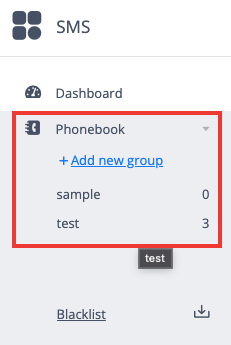
Open the group from which you wish to delete the contacts from the Phonebook section in the SMS panel.
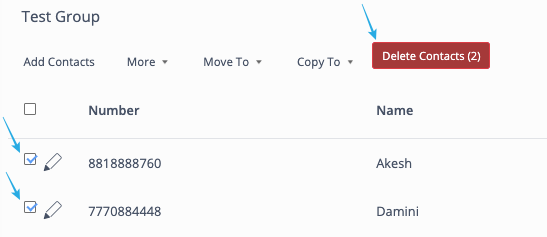
Checkmark/select the contact that you wish to delete and click on the "Delete Contacts" button given at the top bar.
Note: You can also Move or Copy these selected contacts to another group by simply using the "Move To" and "Copy To" buttons given at the top bar.
Steps to delete selected contacts from a group:
Open the group from which you wish to delete the contacts from the Phonebook section in the SMS panel.
Checkmark/select the contact that you wish to delete and click on the "Delete Contacts" button given at the top bar.
Note: You can also Move or Copy these selected contacts to another group by simply using the "Move To" and "Copy To" buttons given at the top bar.