
Automatic creative optimizations : WhatsApp template message
Automatic Creative Optimizations automatically generates and tests multiple variations of your marketing templates by applying subtle changes to elements such as the image header and creative treatment.
This feature introduces creative variability for performance optimization, meaning the output may vary between messages even with the same input. This capability tests minor variations of your existing image header and automatically selects the variant getting the highest click-through rate over time.
The optimizations and variations are mentioned below:
1. Image brightness and contrast.
2. Image Touchups
3. Text Extraction for Headline
4. Text Extraction for Tap Target
5. Text Formatting Optimization
Please find the explanation of each optimization:
A) Image brightness and contrast and touch up :
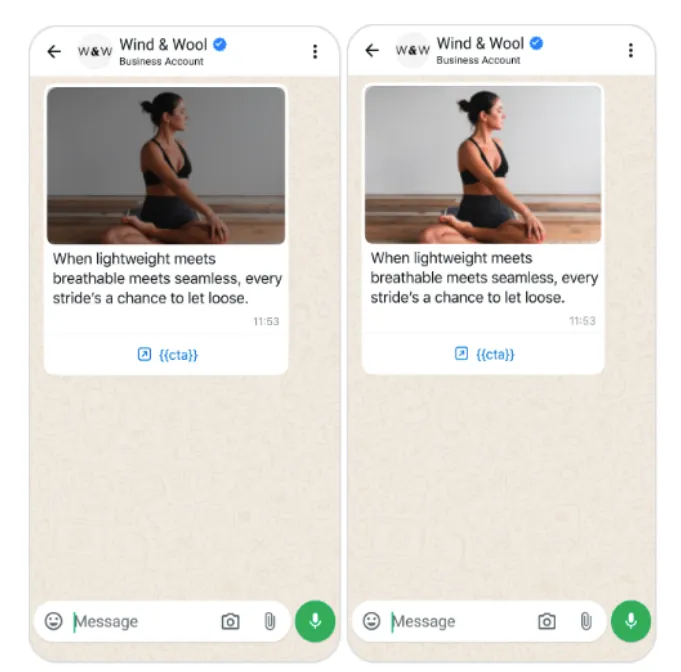
For some campaigns, Meta automatically applies the most effective filters to header images in order to enhance the images’ quality and appeal:
B) Text Extraction for the Headlines:
For some campaigns, Meta extracts keywords or phrases from your message to create a headline for your body text to highlight key information.

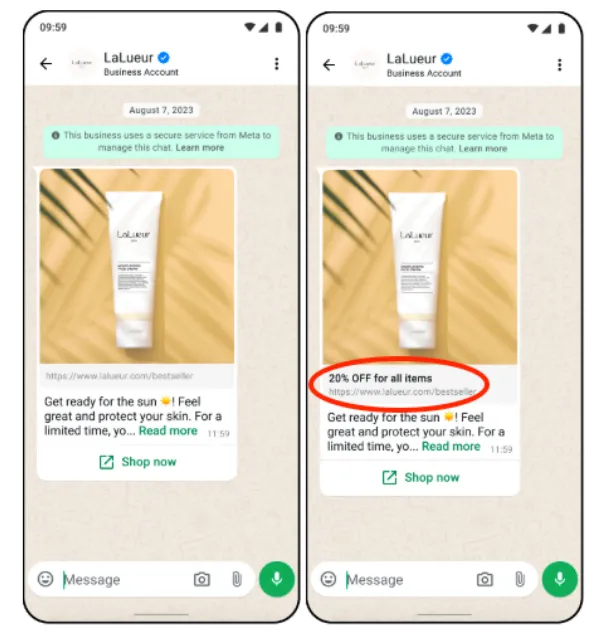
C. Text Extraction for Tap Target :
For some campaigns, Meta extracts keywords or phrases from your message to create a title for the tap-target area to highlight key information.
D. Text Formatting Optimization :
For some campaigns, Meta updates the formatting of text (for example, removing unnecessary spaces, bolding phrases) to increase performance and message digestibility. No text content is changed - format only.

MSG91 now provides you with the flexibility to enable or disable Meta's automatic creative optimization features based on your business requirements. These features are designed to improve the performance of your WhatsApp Marketing templates by automatically testing and optimizing creative elements, helping increase customer engagement over time.
To give you greater control, MSG91 displays the live status of all creative optimization features made available by Meta. You can review which optimizations are currently active and choose whether to apply them to your marketing templates.
To configure this setting, follow the steps below:
MSG91 Dashboard → WhatsApp → Settings → Select the Optimization feature → Enable/Disable → Save Changes
Once the changes are saved, the selected optimization setting will be applied to your WhatsApp account.
.webp)
By managing these settings, you can:
Enable or disable Meta's automatic creative optimizations.
Control how optimization features are applied to your WhatsApp Marketing templates.
View the real-time status of available optimization features directly from your MSG91 account.
Adjust the settings at any time to align with your campaign objectives and business preferences.