
How to Receive SendOTP API Delivery Reports via Webhook
You can use the Webhook feature on the MSG91 platform to receive delivery reports for your OTPs sent via SendOTP API. Follow the steps below to set it up:
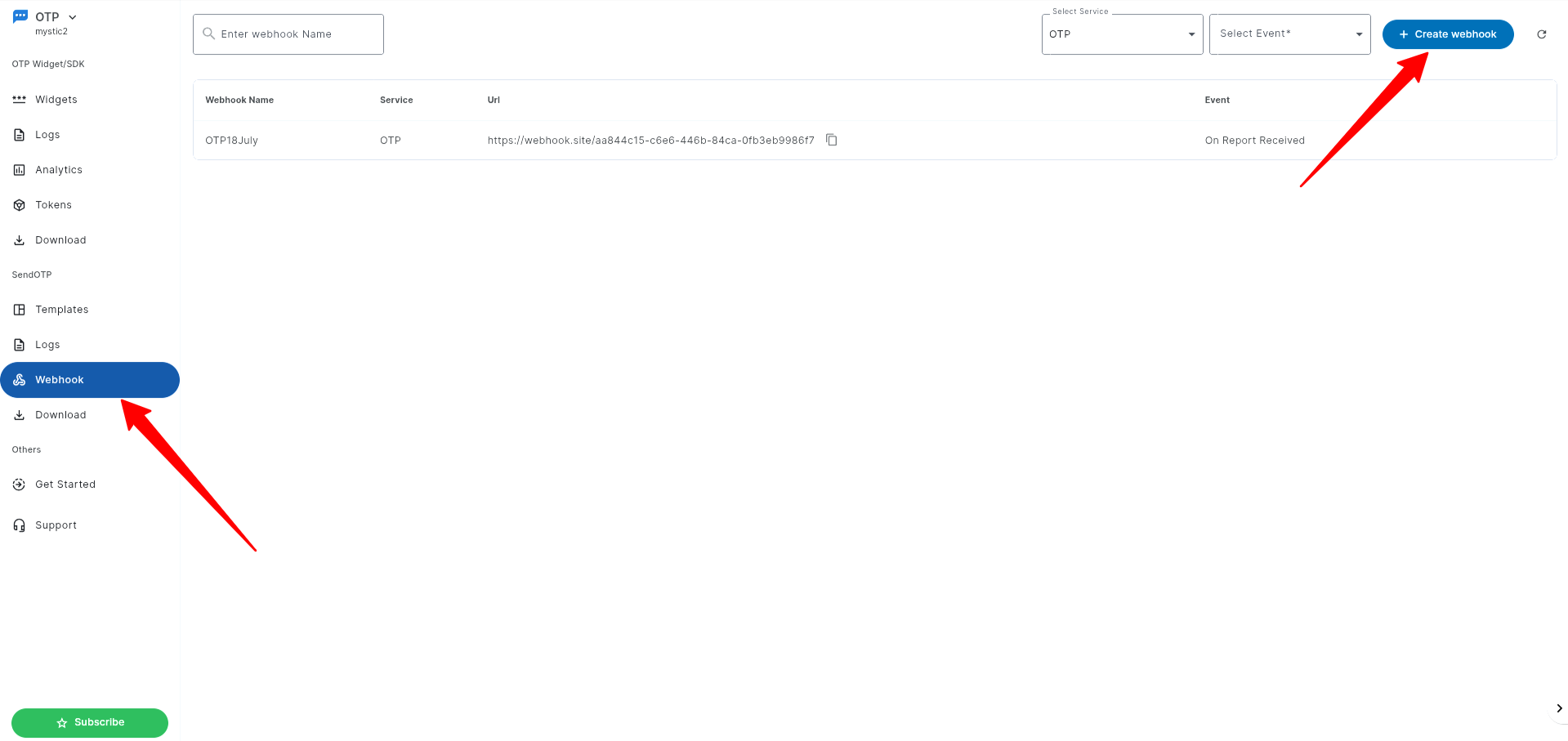
1. Log in to your MSG91 Dashboard » OTP » Webhook » Click on Create Webhook.
2. Configure Your Webhook
.png)
Step 1: Provide a name to your webhook.
Step 2. Select OTP and the event type “On Report Received”:
On Report Received: Provides real-time delivery reports, including success/failure status and additional details.
Step 3. Enter your Webhook URL (Callback URL) where data should be sent.
Content-Type: Only JSON is supported. Ensure your endpoint can parse JSON data in any format.
Step 4. Customize Data Parameters
Use { to add fields/ parameters you want to receive.
You can include or exclude fields as needed. Ensure parameters follow valid JSON formatting.
Example JSON payload with all the available parameters:
{
"CRQID": "{{CRQID}}",
"requestedAt": "{{requestedAt}}",
"requestId": "{{requestId}}",
"telNum": "{{telNum}}",
"countryName": "{{countryName}}",
"status": "{{status}}",
"senderId": "{{senderId}}",
"deliveryTime": "{{deliveryTime}}",
"credit": "{{credit}}",
"smsLength": "{{smsLength}}",
"pauseReason": "{{pauseReason}}",
"voiceRetryCount": "{{voiceRetryCount}}",
"otpRetry": "{{otpRetry}}",
"verified": "{{verified}}",
"failureReason": "{{failureReason}}",
"userIp": "{{userIp}}",
"flowID": "{{flowID}}",
"DLT_TE_ID": "{{DLT_TE_ID}}",
"campaignName": "{{campaignName}}",
"telecomCircle": "{{telecomCircle}}",
"circleDescription": "{{circleDescription}}"
}
Description of the parameters:
CRQID
A custom parameter you can pass in the API payload. You will receive the same value in the webhook
Example: "CRQID": "MSG91SendOTPAPI"
requestedAt
The timestamp indicating when the message request was initiated from your system.
Example: "requestedAt": "2025-07-19T07:15:43.000Z"
requestId
Unique ID generated for each message request.
Example: "requestId": "3567736c53515771356c4878"
telNum
The user’s mobile number.
Example: "telNum": "9177488479XX"
countryName
Name of the country to which the OTP was sent.
Example: "countryName": "India"
status
Message status – Delivered / Failed.
1 = Delivered
2 = Failed.
Example: "status": "1"
senderId
Sender ID used to send the SMS.
Example: "senderId": "TXTAPI"
deliveryTime
Timestamp indicating when the SMS was delivered.
Example: "deliveryTime": "2025-07-19T12:45:44.000Z"
credit
Total charges deducted for the SMS sent.
Example: "credit": "0.22"
smsLength
Number of credits deducted based on the character count of your SMS.
Example: "smsLength": "1”
pauseReason
The reason due to which the OTP request was paused.
Example: "pauseReason": ""
voiceRetryCount
Number of times the OTP was resent via the Voice call.
Example: "voiceRetryCount": "2"
otpRetry
Number of times the OTP was resent.
Example: "otpRetry": "2"
verified
Shows if the OTP was verified via the VerifyOTP API. 1 = verified, blank = not verified.
Example: "verified": "1"
failureReason
The reason for the failure of your SMS.
Example: "failureReason": "Absent Subscriber"
userIp
IP address from which the request was sent.
Example: "userIp": "54.86.50.139”
flowID
MSG91 template ID of your OTP template.
Example: "flowID": "63ef3040d6fc054462756d53"
DLT_TE_ID
DLT Template ID of your message.
Example: "DLT_TE_ID": "1307160975559044358"
campaignName
Name of your Template that you used to send the OTP.
Example: "campaignName": "Login_OTP"
telecomCircle
The telecom circle of the customer’s mobile number.
Example: "telecomCircle": "Madhya Pradesh & Chhattisgarh"
circleDescription
Description of the telecom circle.
Example: "circleDescription": "State of Madhya Pradesh and State of Chhattisgarh"
Sample payload of the data received on Webhook:
{
"CRQID": "0",
"requestedAt": "2025-07-19T06:56:28.000Z",
"requestId": "3567736c7a4164736a357955",
"telNum": "917748847990",
"countryName": "India",
"status": "1",
"senderId": "TXTAPI",
"deliveryTime": "2025-07-19T12:26:29.000Z",
"credit": "0.22",
"smsLength": "1",
"pauseReason": "",
"voiceRetryCount": "",
"otpRetry": "",
"verified": "",
"failureReason": "",
"userIp": "2600:1900:0:3902::700",
"flowID": "63ef3040d6fc054462756d53",
"DLT_TE_ID": "1307160975559044358",
"campaignName": "Testing",
"telecomCircle": "Madhya Pradesh & Chhattisgarh",
"circleDescription": "State of Madhya Pradesh and State of Chhattisgarh"
}
You can also add the Headers in the key-value pairs, and we will send all the reports including these Headers:

Final Step: Click Create to save the Webhook.
Still have questions?
Feel free to reach us at +91 731 691 4364 via call or WhatsApp, or drop an email to [email protected].